TL;DR
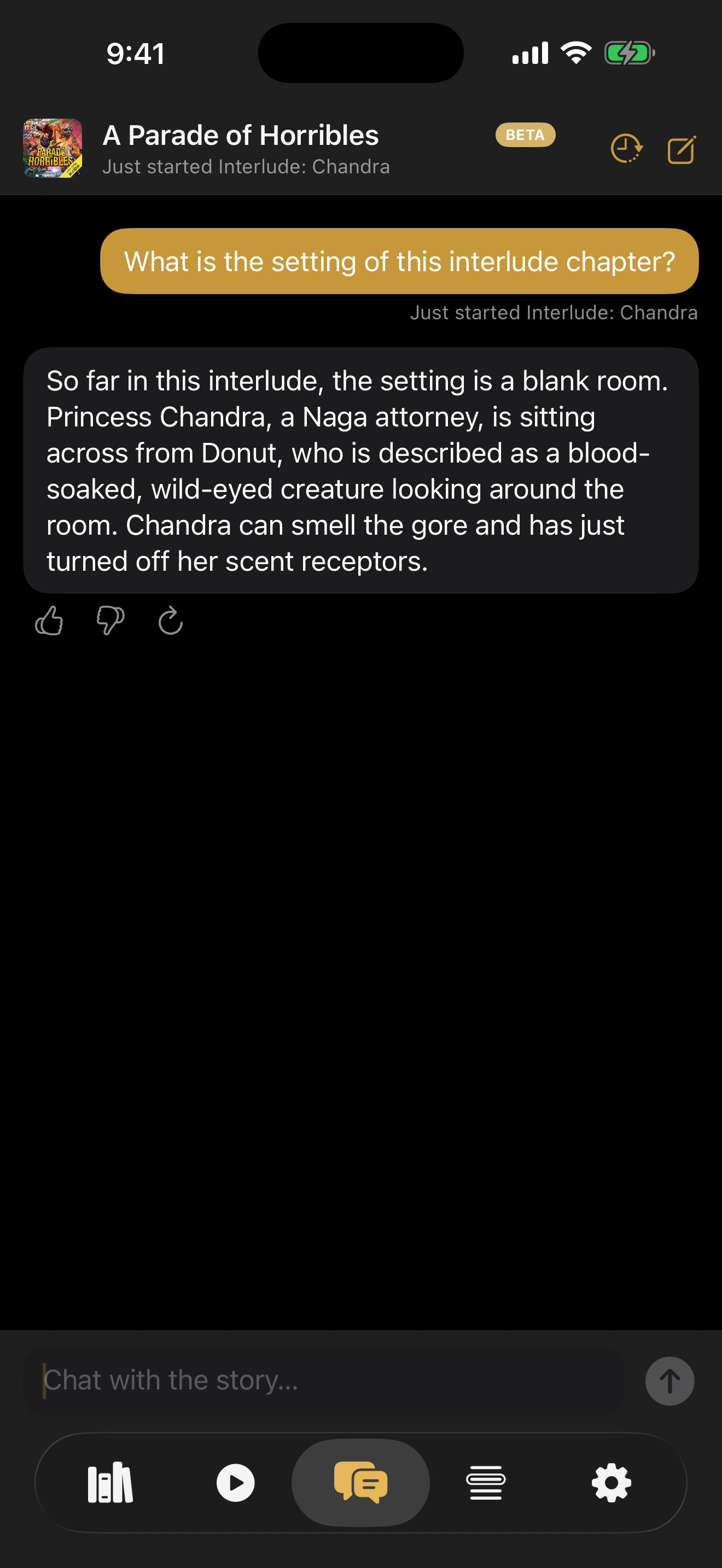
I built Book Chat, a new beta feature in Bloox that lets you ask questions about the audiobook you are currently listening to. It uses your heard-so-far transcript to answer questions about forgotten characters, confusing scenes, and the small details that tend to escape while you are walking, driving, or doing dishes.
The feature started as a very manual Claude Desktop experiment, went through a playground and several model providers, and now uses Gemini 2.5 Flash for answers. One important privacy note: Book Chat is optional, and unlike Bloox’s on-device transcription and recap features, your question and relevant book context are sent to Bloox servers when you use it.
A few weeks ago, I found myself asking a slightly dangerous product question.
Dangerous in the fun way. The kind of question that can either produce a genuinely useful feature or quietly consume your evenings for the next week.
The question was:
Now that Bloox can transcribe an audiobook on-device, what can I do that other audiobook apps simply cannot?
By that point, Bloox already had a few unusual building blocks. It could generate a synchronized transcript while you listened. It could highlight the current sentence like lyrics in a music app. It could help you identify characters. It could generate a spoken “What did I miss?” recap after your attention wandered off to wherever attention goes when you are washing a pan and suddenly start thinking about whether you replied to that email.
Those features were useful on their own.
But a transcript is more than a reading view. It is also a record of what the listener has actually heard.
And once I had that, a new possibility appeared.
What if you could talk to your book?
The first prototype was extremely sophisticated
By which I mean I copied a transcript, pasted it into Claude Desktop, and started asking questions.
This is one of my favorite ways to test an AI product idea. Before building a screen, before writing a backend, before deciding whether the button should have a tiny sparkle icon or a slightly different tiny sparkle icon, try the dumbest version that can answer the actual product question.
In this case, the product question was not “can a language model answer questions about text?”
Obviously it can.
The question was whether it felt valuable in the strange context of an audiobook. Listening is not reading. If I am already sitting down with a book open in front of me, I can flip back a few pages. But when I am walking outside with headphones on, or driving, or trying to remember why a character is suddenly furious about something that happened three chapters ago, the friction is very different.
I pasted in some transcript context from a book I was listening to and asked basic questions:
- Who is this person again?
- Why are these two characters fighting?
- Where is this scene taking place?
- Am I supposed to understand what this reference means yet?
The answers were not perfect. Some were too long. Some sounded like a very diligent literature student had been given five minutes to prepare a report. But the feeling was there almost immediately.
This was not a novelty.
It solved a real problem.
The interesting thing was not that an AI could answer questions about a book. It was that the app knew exactly how much of the book you were allowed to ask about.
The spoiler problem is the whole product
A generic chatbot can talk about a book. That part is easy.
Unfortunately, a generic chatbot can also casually tell you that the helpful innkeeper is secretly the villain, the villain is actually three children in a trench coat, and the entire second half of the book takes place inside a dream. I am making those examples up. Probably. There are a lot of books.
For an audiobook companion, spoilers are not a minor edge case. They are the edge case.
Bloox already knew where I was in the book. It had timestamps. It had chapter boundaries. It had the transcript generated up to my current position. So the first real product decision was simple to describe, even if it took more work to implement:
Book Chat should answer from the story you have heard so far, not from the story as a whole.
That means the system needs to know the listener’s position when the conversation begins. It needs to gather the relevant transcript context. It needs to treat future material as off-limits. And when the available transcript does not contain enough evidence, it needs to say so instead of improvising a confident answer from elsewhere.
This also changes the kinds of questions the feature is good at.
Book Chat is not trying to write a graduate thesis about the symbolism of the sea in Moby-Dick. It is trying to help when you are 47 minutes into a chapter and cannot remember why a name sounds familiar.
Small questions. Context questions. The tiny knots that accumulate until a book starts feeling harder to follow than it should.
Why not just make better recaps?
This was a real question.
Bloox already had “What did I miss?”, which is basically a catch-up feature for the last few minutes of the book. It is useful when your attention drifts and you want the app to quickly explain what just happened.
So why build chat?
Because a recap chooses the question for you.
That is great when the problem is general confusion. But a lot of audiobook confusion is annoyingly specific. You do not always need a summary of the last seven minutes. Sometimes you need to know whether the person speaking is the same person mentioned two chapters ago. Sometimes you need to know whether a scene is a flashback. Sometimes you just want to ask, “wait, are we still in the castle?”
A good recap is a blanket.
Book Chat is more like a flashlight.
That distinction helped me avoid turning the feature into a general-purpose literary chatbot. The goal was not to answer every possible question about a book. The goal was to help the listener recover the thread they were already following.
Then I built a playground
Once the pasted-transcript version felt useful, the next question was whether it could survive contact with actual software.
Manual testing in Claude Desktop is great for discovering an idea. It is less great when you want to compare models consistently, inspect latency, test long books, understand token usage, and avoid relying on the scientific method known as “I think that answer felt a little better, maybe.”
So I moved the experiment into a playground.
The playground let me send the same transcript context and questions through different models and inspect the results. That mattered because Book Chat has a fairly unusual workload. A long audiobook transcript can be enormous. The model needs enough context to remember details from much earlier in the story, but it also needs to answer quickly enough that the user does not assume the app has gone out for coffee.
And it needs to be affordable.
Bloox is a free side project. There is no subscription waiting behind a cheerful seven-day trial. If I accidentally create a feature that turns every interesting user question into a tiny invoice, I will eventually be forced to learn a valuable lesson about unit economics at an inconvenient time.
The first coded version worked. Slowly.
The first coded proof of concept used DeepSeek V4 Pro through NVIDIA NIM.
It answered questions. The answer quality could be quite good. It was a real working feature, not a mockup.
It was also sometimes taking 30 to 35 seconds.
Thirty seconds is not especially long in absolute terms. You can spend thirty seconds looking for your keys while holding your keys.
But thirty seconds is a very long time after tapping Send in a chat interface. Chat has trained all of us to expect a response almost immediately. If nothing appears, the user does not think, “how thoughtful, the model is carefully reviewing the narrative structure.” The user thinks the feature is broken.
I added progress messages. Thinking. Checking the story context. Connecting the dots. That helps a little. Honest progress feedback is better than a motionless screen.
But copy cannot solve latency.
So I kept testing.
A very small model tournament
I tested DeepSeek directly. I tested an OpenRouter route. I tested Gemini. I kept the test transcript intentionally unpleasant: 9,846 lines from a long book, because a feature like this should not only work in the tidy demo case where the relevant answer is sitting six paragraphs above the question.
There was no single magic metric. I cared about a combination:
- Did the answer actually help?
- Did the model respect the spoiler boundary?
- Could it handle a large amount of context?
- How long did the listener wait?
- Could I afford to let real people use it?
I eventually landed on Gemini 2.5 Flash for the main answer path.
It was the best balance I found: good answers, a large enough context window for the long-book problem, substantially better latency, and a free tier that makes sense for a beta feature in a free app. I kept Gemini 2.0 Flash as a fallback route for lighter requests.
The choice may change again. That is part of the design. The app talks to a small Cloudflare Worker that can route requests to different model providers without requiring an App Store release. If a provider gets better, slower, more expensive, less available, or develops a sudden fascination with answering every question as a haiku, I can adjust.
I do not think choosing a model should be a one-time religious conversion.
It is an operating decision.
The beta got simpler as I tested it
The early version had an Advanced section. This is often a warning sign.
It included a web-search option. The theory was reasonable: perhaps public metadata could help with names or setting details. But every extra toggle creates a question for the user. Should I enable this? Is it safe? Will it spoil something? Why am I configuring a search strategy when I only wanted to know who Chandra is?
After testing, I removed it.
The transcript should do the heavy lifting. If a control is not earning its place, it should leave.
I also added starter questions for an empty conversation. A blank chat box is surprisingly demanding. It asks the user to understand what the feature can do before the feature has shown any value. Bloox now suggests questions based on the current listening context. When Apple Intelligence is available, those starter questions are generated on-device. If local generation is unavailable or fails, the app falls back to a server-generated set.
That is a small detail, but I like it. It uses the cheaper, more private path first, and it makes the first screen less intimidating.
I added thumbs-up and thumbs-down feedback to each response. Not because I enjoy adding tiny icons to screens, although apparently I do that quite often, but because model quality is slippery. A backend request log tells me how long an answer took. It does not tell me whether the answer helped.
There was another kind of feedback too: behavioral feedback. Watching myself and beta testers use the feature made it clear that the first screen mattered more than I expected. If the keyboard popped at the wrong moment, the welcome explanation felt broken. If the suggestions flashed and changed too quickly, the feature felt nervous. If the progress message stayed frozen, people assumed the request had failed.
None of these issues sounds like the big idea. They are not the glamorous part of the product. They are also the difference between “interesting prototype” and “thing a normal person might actually use twice.”
So the beta got a lot of small adjustments. The tab icon changed so it did not visually fight with the transcription tab. The welcome sheet got a “Maybe later” path instead of forcing a decision. Empty chats delete themselves so the history sheet does not fill with accidental ghosts of conversations that never happened. Cross-book chats open read-only, because letting someone continue a conversation about one book while another is loaded is the kind of subtle confusion that becomes a support message three weeks later.
These are the details I enjoy more than I probably should.
They are also product work.
And I made the privacy boundary explicit.
This part does not run entirely on your phone
Most of the AI features in Bloox are on-device. Transcription runs locally. “What did I miss?” recap summaries run locally. That is one of the main reasons I built the app the way I did.
Book Chat is different.
When you choose to use Book Chat, your question and relevant book context are sent to Bloox servers so the model can provide an answer. The feature is optional. The first time you open it, Bloox shows a clear explanation and asks you to start chatting or come back later.
I do not want to hide that distinction inside a privacy policy that nobody reads except lawyers and unusually determined people.
There is a tradeoff here. Server models are currently much better suited to this kind of long-context conversation than the on-device options available to an indie iOS app. The honest product decision is to explain the tradeoff clearly and let the user choose.
I also tried adding voice input
This made sense on paper.
Audiobooks are often a hands-busy medium. People listen while walking, driving, cleaning, or exercising. Typing a question is not ideal in many of those situations. A microphone button felt like a natural next step.
So I built a version.
Then I tested it on a real iPhone.
Within about an hour, I hit three different crash paths involving speech permissions, audio-session switching, and realtime audio processing. The simulator had been far more optimistic about the whole arrangement.
I removed the feature.
Not postponed the crash fixes until after release. Not quietly left the button behind a cheerful beta label. Removed it.
I still think voice input belongs in Book Chat. I have a better idea of how to build it now, using the newer speech APIs and a cleaner handoff for audio-session ownership. But one useful part of shipping software is knowing when an experiment has earned another iteration instead of a production release.
What is still missing?
Streaming.
Right now, the model completes the answer before Bloox displays it. That means the user may still wait several seconds staring at progress text. The next meaningful improvement is to stream the response as it arrives, so the first words appear quickly even when the complete answer needs more time.
There are other ideas too. Reading answers aloud. Better retrieval strategies for very long books. Perhaps voice input again, once it behaves itself.
But the current beta is already useful in the way I hoped it would be.
It is also very deliberately a beta.
I know that word can be abused. Sometimes it means “we shipped it and would prefer not to be held responsible.” That is not what I mean here. I mean the shape of the feature is right, the core value is real, and the remaining work is best guided by actual use rather than private imagination.
For example: do people mostly ask factual context questions, or do they want interpretation? Are they annoyed by the wait, or do they tolerate it because the answer is valuable? Do they trust the spoiler boundary? Are the starter questions helpful, or do they accidentally train people to ask less interesting things?
I can guess. I can make a spreadsheet. I can stare very seriously at my own guesses in a coffee shop.
But real usage is better.
The point is not to chat for the sake of chatting
There is an easy version of AI product development where you place a chatbot in the corner of an app and declare that the app now has AI.
That was not interesting to me.
What interested me was that Bloox had something a generic chatbot did not: the listener’s relationship with this particular book, at this particular moment.
It knew what you had heard.
It knew what you had not heard.
It knew that the correct answer is sometimes not a beautiful essay, but a two-sentence reminder that lets you keep listening without losing the plot.
That is the job.
Try Book Chat with your next audiobook
Bloox is free on the App Store. Book Chat is an optional beta feature for listeners who want a little help following the story.
Download Bloox Learn more about Bloox →Already have a large Audible library? You might also like my guide to importing Audible books directly into Bloox.